NPCCrowd
Overview
Fields Female Clips Size set the number of custom female animations Elements Drag the animations here Male Clips sets the number of custom Male animations Male ID Sets the number c
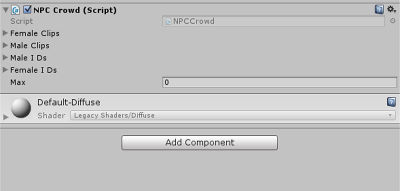
Fields
Female Clips Size
set the number of custom female animations
Elements
Drag the animations here
Male Clips
sets the number of custom Male animations
Male ID
Sets the number custom male outfit IDs
Female ID
sets the number of female outfit IDs
Max
Max number of NPCs to spawn
Usage
Female clips: this sets the number of custom animations you want female NPC to have.
After setting the size drag animation for each in the element field.
Male clips: this sets the number of custom animations you want male NPC to have.
After setting the size drag animation for each in the element field.
Female IDs: this sets the number of custom outfits you want female NPC to have.
After setting the size drag outfit ID for each in the element field.
Male IDs: this sets the number of custom outfits you want Male NPC to have.
After setting the size drag outfit ID for each in the element field.
Player Outfit ID Log in to http://sine.space/ and click the "Outfit" menu button. Create and save the outfit you want for your NPC. You will see when you save your named outfit that a unique number is added at the end.
MAX: this sets the max number of NPCs to spawn