GravityZone
Overview
Fields Priority Sets the priority Local Gravity Set the gravity values for x,y,z axis Usage Create an empty object add GravityZone component.
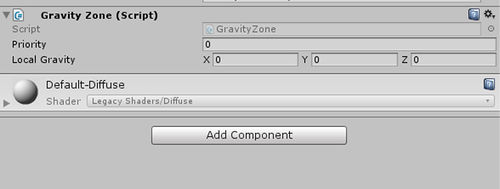
Fields
Priority
Sets the priority
Local Gravity
Set the gravity values for x,y,z axis
Usage
Create an empty object add GravityZone component. Add a Box collider with isTrigger checked, edit the constrains of the box collider to set the area size.
Priority Sets the priority of the gravityzone
local Gravity Sets the local gravity for x,y,z axis.
As an example, the default gravity could be Priority = 10, and the axis is (0,-1,0). If you want to make an environment like moon, set the Priority < 10, otherwise Priority > 10.
(0,-1,0) means the direction of Gravity is downward. You can also set to another direction as your wish.