AvatarEffectObject
Overview
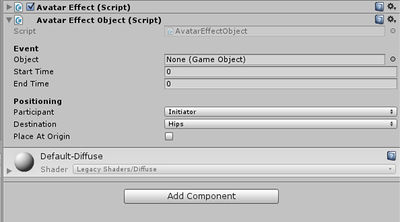
Fields Object drag the prop here Start Time Spawn time of the prop End Time DE spawn time of the prop Participant Set the participant type initiator/receiver Destination Choose the
Fields
Object
drag the prop here
Start Time
Spawn time of the prop
End Time
DE spawn time of the prop
Participant
Set the participant type initiator/receiver
Destination
Choose the bone on which the prop attaches to
Usage
Click on Add Component under the Inspector window, and search for Create object attach in the search bar.
You can add as many separate props as you want, each with their own attachment points or location, and each with their own start and end times.
Drag the prop itself into the Object field.
Use Start Time and End Time fields to set when your prop spawns and despawns.
For single person gestures leave the Participant field as Initator.
For multi-person gestures you can select the Initiator or Recipient for each prop; so you can have them sit down simultaneously, or have them both drop on the floor.
Use the destination drop down to attach your prop to any bone on the skeleton of the avatar, for example, if you wanted an avatar to be holding a whip, you would attach it to the hand bone.