AvatarEffectLUT
Overview
Fields LUT Image Drag LUT image here Start Time Start time of LUT effect End Time End time of LUT effect Usage Click on Add Component Under the Inspector window and search for Color LUT in the search bar.
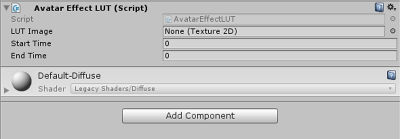
Fields
LUT Image
Drag LUT image here
Start Time
Start time of LUT effect
End Time
End time of LUT effect
Usage
Click on Add Component Under the Inspector window and search for Color LUT in the search bar.
This has the settings;
- LUT Image- This is the image used for the LUT.
- Start time- Start time of the image playing along with the gesture.
- End time- End time of the image playing along with the gesture.
For more information on how to create the images for the LUT, please go to this page Gestures/FX