AvatarEffect
Overview
Fields Participants Sets no of participants Is Gendered Lets user choose Nominal gender Nominal Lets user choose Nominal gender Uses Radius Allows you to choose area radius Entry R
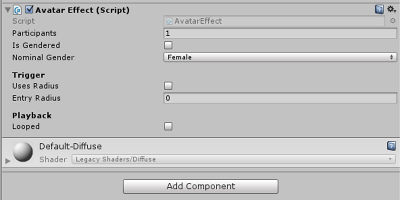
Fields
Participants
Sets no of participants
Is Gendered
Lets user choose Nominal gender
Nominal
Lets user choose Nominal gender
Uses Radius
Allows you to choose area radius
Entry Radius
Lets you enter radius; this needs entry radius checked
Looped
Sets animation to be looped.
Usage
When you import an animation into Unity you will then add that animation to a game object (there are templates in the Gestures folder in your project).
That game object has scripts added to it, depending on what you are doing with your gesture.
click on Add Component and search for AvatarEffect in the search bar to add animation effects to your avatar.
The settings under this component include:
- Participants- This allows to change from 1 to 2 participants
- Is Gendered- This allows you to choose whether or not the gesture is gender specific
- Nominal Gender- You can choose which gender is nominal, but it will still play with both genders.
- Trigger:
- Uses Radius: This means the gesture will use a radius of an area
- Entry Radius: You can set the entry radius amount for the gesture area